Design System
2025
Increasing Design & Dev Efficiency by 40%: Migrating Complex GIS Systems to a Hybrid Design Strategy
I led the design system strategy and negotiated a hybrid framework that integrated MUI with native GIS components. I audited the architecture to resolve technical deadlocks and personally established our unit’s first unified visual identity. This role bridged the gap between engineering, design and GIS mapping teams, to ensure a unified visual identity to represent our unit.
Problem area
Generic libraries (MUI) lacking GIS components required for our product
Our department designs map centric applications. Development were stuck due to the undocumented Esri Calcite "black box" design system, which contained GIS components beneficial to our products. This created a critical deadlock between engineers demanding MUI’s efficiency and stakeholders (mapping & product design teams) protecting mission-critical GIS utility.
Achievements & Goals
What I aimed to achieve
Align Engineering and Design Priorities
I resolved the team conflict by proving a hybrid architecture could fix the documentation crisis without sacrificing our essential mapping tools.
Strategy decision 01
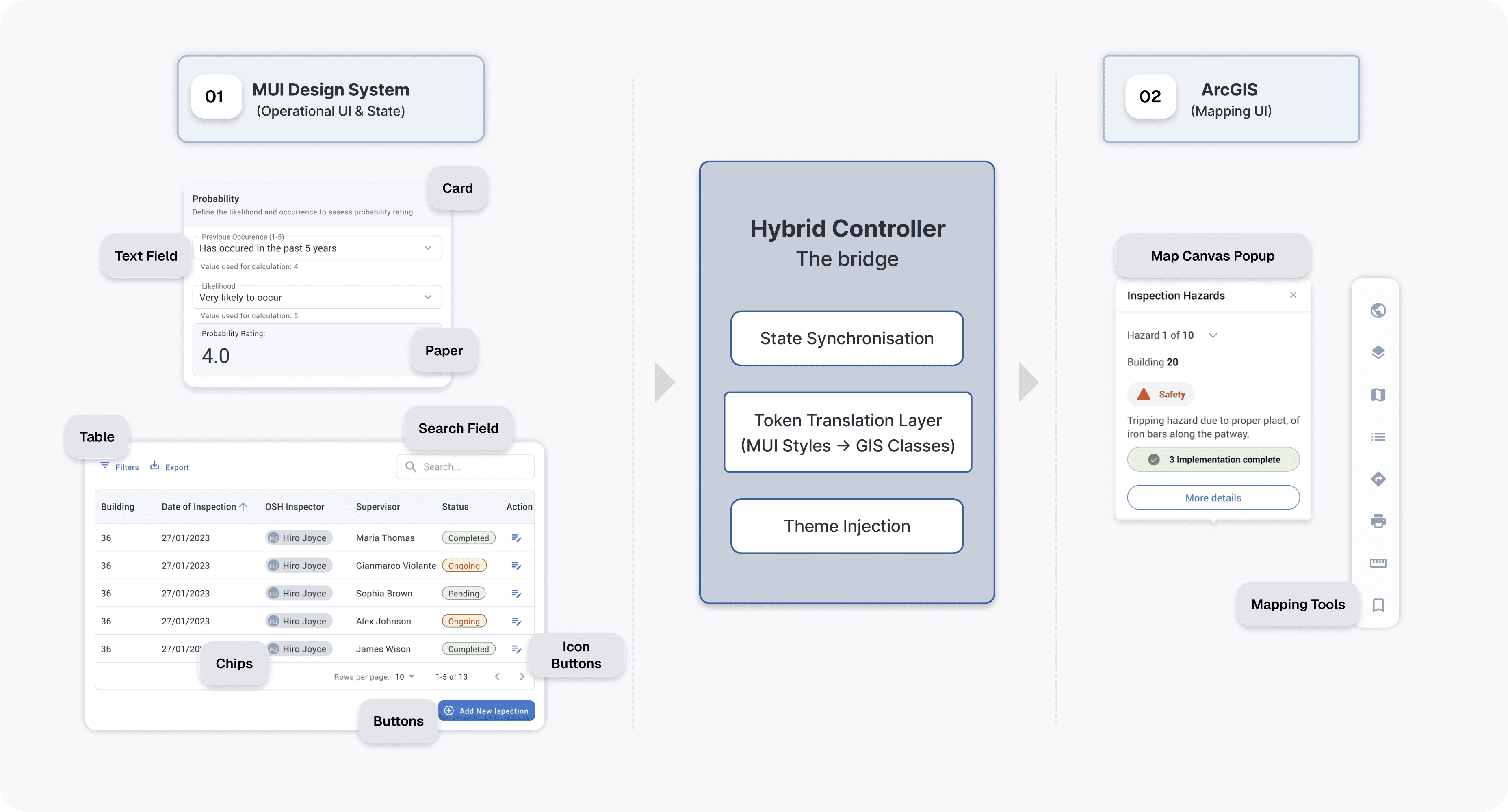
Implementing a Hybrid Stack: Using MUI for the Interface and ArcGIS for the Map
I conducted a technical feasibility audit and determined that rebuilding the missing map components using MUI design system would take months and introduce stability risks. To solve this, I executed a strategy focused on reusing existing assets
Steps to use the existing assets:
Strategy decision 02
Standardisation of GIS native components to accelerate delivery
The technical architecture provided the foundation and saved development time, but it introduced a visual mismatch between the modern MUI shell and the legacy map widgets. To bridge this gap, I included the mapping team in the process and executed a Component Standardisation Strategy:
01
Automated Visual Audit
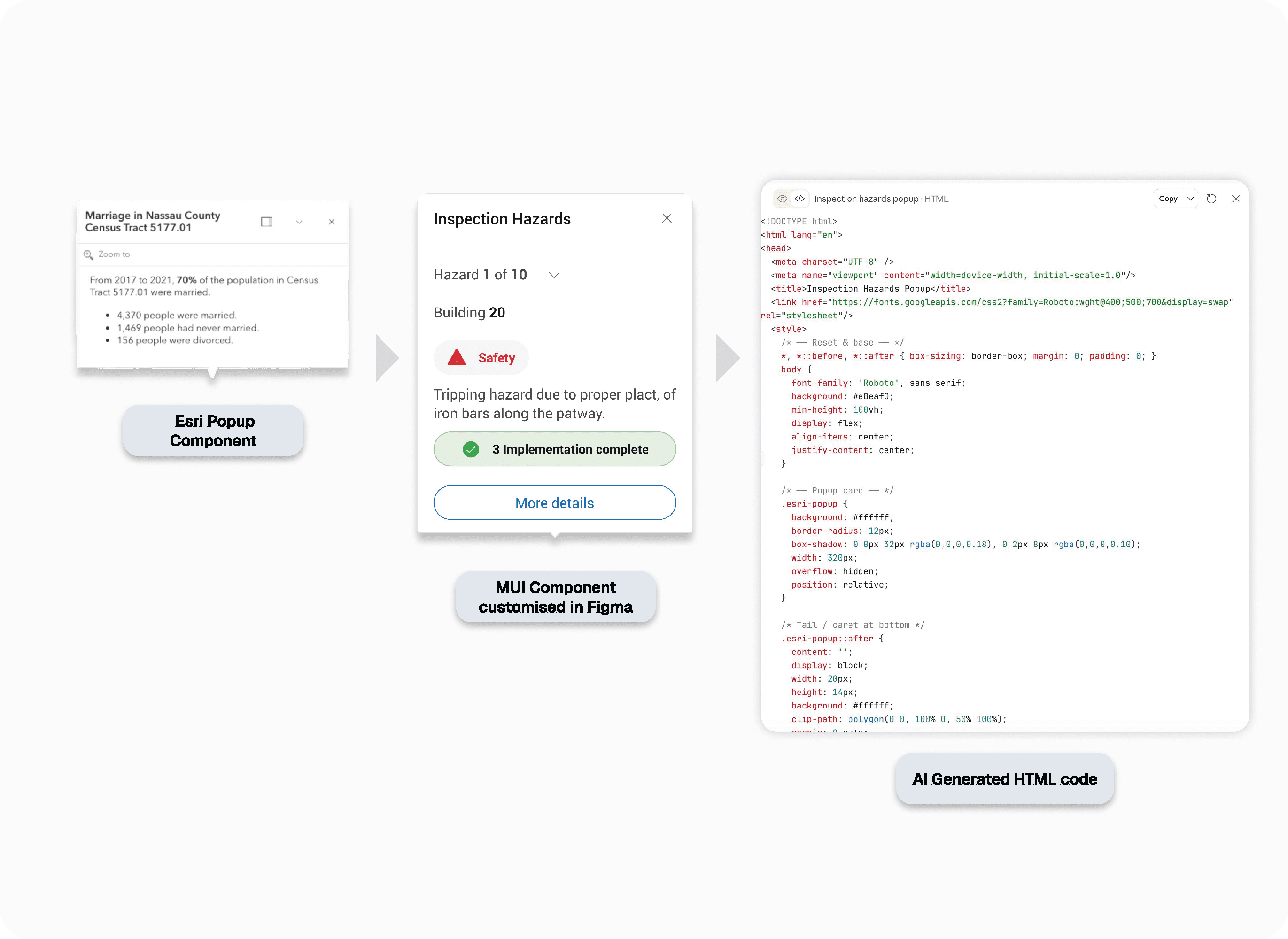
I used AI to inspect the style gaps between ArcGIS and MUI, and exported a data-driven checklist to extract visual features and flag errors in padding, radius, and color.
02
The Token Bridge
I designed the target UI in Figma using Semantic Tokens (border.corner-radius.round, color.border.3, color.foreground.1) to ensure perfect parity with the core app.
02
Visual Governance
I used AI to translate those Figma specs into clean, native HTML/CSS. This provided a "behavioral source of truth" that cut meeting times by 60% and eliminated manual coding errors.
02
Visual Governance
By shipping the AI-generated code directly to the Mapping Team, they could configure widgets in Esri themselves, freeing our developers from maintaining redundant UI components.
Pop-up Esri component example: Redesign using MUI design system and coded to HTML
Design decision 03 WIP
Optimising Handoff via Figma to Code Pipeline
I am currently implementing the Figma for VS Code plugin to eliminate the "translation gap" between design and code. By giving developers direct access to CSS properties and design tokens inside their IDE, we are removing manual red-lining and ensuring 100% styling accuracy. This integration is expected to further reduce frontend development time by 20% by allowing for direct "copy-paste" implementation of MUI-compliant components.
Key Learnings
01
"System Purity" vs. "Business Reality"
I almost delayed delivery by over engineering for system purity. I learned that a hybrid architecture solves business problems faster by using specialized tools for specialized problems.
Retrospective
Avoiding custom development saved significant engineering time and increased efficiency by 40%
Impact
Unified Organizational Branding
Established a distinct visual identity that ensures our unit’s products are instantly recognizable and branded across the entire organization.